
⚡ What You Will Build
- The Goal: A script that watches the price of Bitcoin for you, 24/7.
- The Trigger: You set a “Buy Price.” If Bitcoin drops below it, the script activates.
- The Result: You get a real pop-up notification on your desktop saying “BUY THE DIP!”
- The Tech: You will learn about APIs (connecting to the internet), JSON data, and desktop notifications.
Are you tired of refreshing CoinMarketCap every five minutes?
In the world of crypto, missing a dip by an hour can cost you serious money. But you can’t stare at charts all day. You have a job, a life, and you need to sleep.
Today, we are going to solve this with automation. We will build a Python bot that watches the market for you and pings you only when it’s important.
Prerequisites: The Setup 🛠️
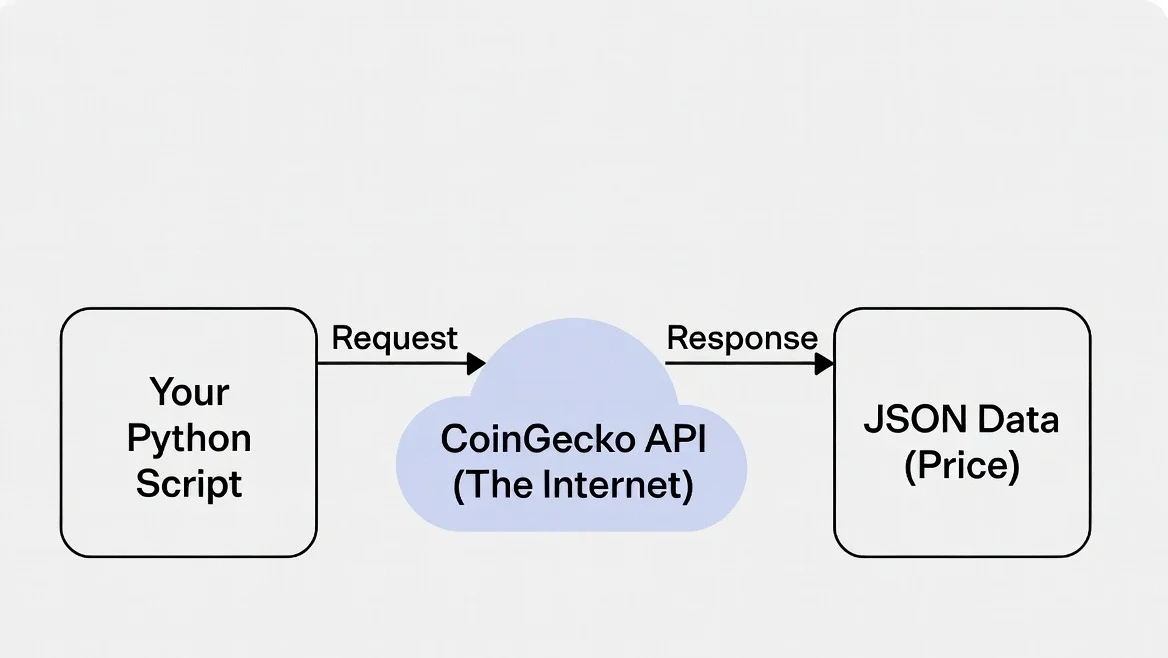
We need your Python script to do two new things today: talk to the internet and talk to your operating system’s notification center. We need two libraries for this.
Open your terminal (or Command Prompt) and run this command:
pip install requests plyer- requests: The standard way for Python to download data from the web.
- plyer: A tool that lets Python send native notifications on Windows, Mac, and Linux.
Step 1: Getting the Data (Understanding APIs) 🌐
How does a script get the price of Bitcoin? It asks an API (Application Programming Interface).
Think of an API like a digital waiter. You give the waiter an order (“Get me the price of Bitcoin”), the waiter goes to the kitchen (the server), and comes back with your data.
We will use the CoinGecko API because it is free, accurate, and doesn’t require a complicated API key for basic use.
The Code to Fetch Data
Create a new file called crypto_alert.py in VS Code and add this code:
import requests

# 1. Define the URL for the API (The "Order")
# We are asking for bitcoin in USD without extra metadata
url = "https://api.coingecko.com/api/v3/simple/price?ids=bitcoin&vs_currencies=usd"

# 2. Make the request (Send the "Waiter")
response = requests.get(url)

# 3. Print the raw data received back
data = response.json()
print(data)
Run this script. You should see something like this in your terminal:
{'bitcoin': {'usd': 96543.21}}Step 2: Cleaning the Data (Parsing JSON) 🧹
That output looks weird. It’s not just a number; it’s nested data inside curly braces {}. This format is called JSON.
In Python, JSON is treated like a Dictionary. We need to drill down to get the number we want.
Update your script to grab just the price:
import requests

url = "https://api.coingecko.com/api/v3/simple/price?ids=bitcoin&vs_currencies=usd"
response = requests.get(url)
data = response.json()

# Drill down into the dictionary: 'bitcoin' -> 'usd'
current_price = data['bitcoin']['usd']

print(f"The current price of Bitcoin is: ${current_price}")
Step 3: Adding Logic & Notifications 🔔
Now we have the price. Next, we need the logic: “If the price is low, tell me.”
We will use the plyer library to handle the notification. It works wonderfully across different operating systems with the same code.
Let’s add the logic and the notification trigger:
from plyer import notification
import requests

# --- Configuration ---
TARGET_PRICE = 95000  # Set your "Buy the Dip" price here!
# ---------------------

url = "https://api.coingecko.com/api/v3/simple/price?ids=bitcoin&vs_currencies=usd"
response = requests.get(url)
data = response.json()
current_price = data['bitcoin']['usd']

print(f"Checking... Current price is: ${current_price}")

# The Logic: Is it time to buy?
if current_price < TARGET_PRICE:
    # Fire the notification!
    notification.notify(
        title='💰 BITCOIN ALERT! 💰',
        message=f'BTC has dropped below ${TARGET_PRICE}! Current price: ${current_price}',
        app_name='Crypto Tracker',
        timeout=10  # Notification stays for 10 seconds
    )
    print("Alert sent!")
else:
    print("Price is still high. No alert needed.")
Try setting the `TARGET_PRICE` higher than the current price and running the script to test if the notification appears on your desktop!
Step 4: The Infinite Loop (Running Forever) 🔄
Right now, the script checks once and stops. We want it to run continuously.
We can use a while True: loop to make it run forever. However, crucial warning: we must tell the script to sleep between checks. If we spam the CoinGecko API every millisecond, they will ban our IP address.
We will use the time module to tell Python to wait 5 minutes (300 seconds) between checks.
The Final, Complete Code
import requests
import time
from plyer import notification

# --- Configuration ---
TARGET_PRICE = 95000   # Change this to your target
CHECK_INTERVAL = 300   # How often to check in seconds (300 = 5 mins)
# ---------------------

def get_bitcoin_price():
    url = "https://api.coingecko.com/api/v3/simple/price?ids=bitcoin&vs_currencies=usd"
    try:
        response = requests.get(url)
        response.raise_for_status() # Raise an exception if the API request failed
        data = response.json()
        return data['bitcoin']['usd']
    except Exception as e:
        print(f"Error fetching data: {e}")
        return None

def send_alert(price):
    notification.notify(
        title='💰 BITCOIN ALERT! 💰',
        message=f'BTC has dropped below ${TARGET_PRICE}! Current price: ${price}',
        app_name='Crypto Tracker',
        timeout=10
    )

if __name__ == "__main__":
    print(f"Starting tracker... Alerting if BTC drops below ${TARGET_PRICE}")

    # The Infinite Loop
    while True:
        current_price = get_bitcoin_price()

        if current_price is not None:
            print(f"Checked at {time.strftime('%H:%M:%S')}: Price is ${current_price}")

            if current_price < TARGET_PRICE:
                send_alert(current_price)
                # Optional: Wait longer after an alert so you don't get spammed every 5 mins
                time.sleep(600)

        # Sleep for 5 minutes before the next check
        time.sleep(CHECK_INTERVAL)
Just run this script in a terminal window and leave it running in the background while you work!
Next Steps: Making it Better
Running a script in a terminal window works, but what if you accidentally close the window?
A better approach is to remove the `while True` loop and instead use your computer’s built-in scheduler to run the script every 5 minutes automatically in the background.
Check out our guide on How to Schedule Python Scripts on Windows and Mac to learn how to turn this script into a true background service.
Frequently Asked Questions
Why isn’t the notification showing on Mac?
macOS is strict about notifications. The first time you run it, you might get a pop-up asking to allow notifications from Terminal or Python. You must click “Allow.” If you missed it, check your System Settings -> Notifications.
Can I track Ethereum or other coins?
Yes! Just look at the URL in the code: `ids=bitcoin`. Change `bitcoin` to `ethereum`, `solana`, or `dogecoin` to track other assets.
Is this real-time?
It’s close to real-time. The free CoinGecko API updates every few minutes, and our script checks every 5 minutes. It is perfect for catching big moves, but maybe not for high-frequency day trading.
Want to get this alert on your phone? Learn How to Send Emails with Python.