⚡ Quick Summary
- The Problem: ChatGPT doesn’t know your private data (emails, textbooks, contracts).
- The Solution: RAG (Retrieval Augmented Generation). It lets AI “read” your files before answering.
- The Tool: You can do this privately on your laptop using Ollama.
You have installed Llama 3 locally. You have played with LM Studio. Now, let’s do something actually useful.
Imagine you have a 500-page textbook or a complex legal contract. You don’t want to read the whole thing. You just want to ask: “What does this document say about the warranty period?”
This is possible, and it’s called RAG.
What is RAG? (Explained Like You’re 5)
AI models like Llama 3 are frozen in time. They know everything about the internet up to 2024, but they don’t know about your specific PDF file.
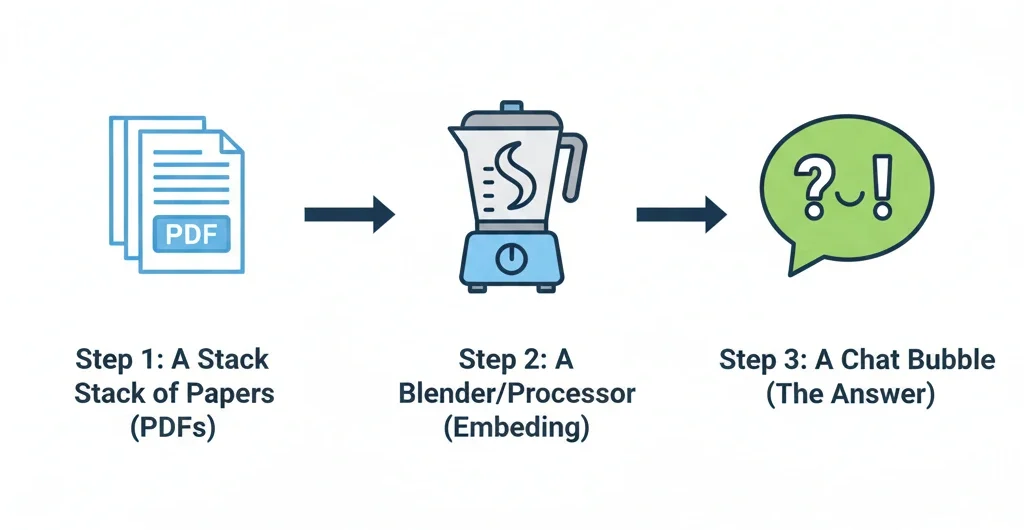
RAG (Retrieval Augmented Generation) fixes this. Here is how it works in 3 steps:
- Retrieval: You ask a question. The system searches your PDF for the specific paragraph that contains the answer.
- Augmentation: It takes that paragraph and pastes it into a hidden prompt for the AI.
(The prompt looks like: “Using this paragraph, answer the user’s question…”) - Generation: The AI reads the paragraph and gives you the answer.
It’s like giving the AI an “open book” test instead of a memory test.
How to Do It Locally (Free) 🛠️
You don’t need to write complex Python code to try this. Since you already installed Ollama, you can use a tool called “PrivateGPT“ or “AnythingLLM“.
The Easiest Method: AnythingLLM
We recommend a desktop app called AnythingLLM Desktop. It connects to Ollama automatically.
- Download AnythingLLM Desktop.
- In the settings, select Ollama as your provider.
- Drag and drop your PDF file into the “Upload” box.
- Start chatting!
The app handles all the complex math (vector embeddings) for you. You just ask questions.
Why This is Huge for Privacy 🛡️
If you upload a legal contract to ChatGPT, OpenAI technically has a copy of it. If you use this Local RAG method, your sensitive documents never leave your computer.
This is perfect for:
- Students: Chatting with textbooks/notes.
- Lawyers: Analyzing contracts.
- Doctors: Searching through medical journals.
What’s Next?
This concludes our “Local AI” week! You have gone from zero to running a private, document-reading AI on your own machine.
Next week, we are switching gears to Python Automation. We will show you how to write scripts that clean your desktop, send emails, and save you hours of work.