
🚀 Quick Overview
- The Problem: Mobile apps (Android/iOS) cannot run Python scripts directly.
- The Solution: Build a “Backend Server” (API) that the app talks to over Wi-Fi.
- The Tech:
FastAPI(The fastest, most modern web framework for Python). - Time to Build: 15 Minutes.
In this tutorial, you will learn how to connect an Android app to a Python backend using FastAPI, allowing your mobile applications to leverage powerful Python logic.
As you build a portfolio of Android apps to generate passive income, you will quickly hit a wall. Mobile phones are great at displaying buttons and screens (the frontend), but they are terrible at running heavy data processing or AI models.
If you build an app that needs to summarize long text using AI or store user data securely in a database, you don’t put that code inside the phone. Instead, you put your Python code on a cloud server, and the phone sends a message asking the server to do the heavy lifting.
This communication bridge is called a REST API. Today, we are going to build one using FastAPI, the modern standard for Python developers.
Step 1: The Concept (How Phones Talk to Servers)
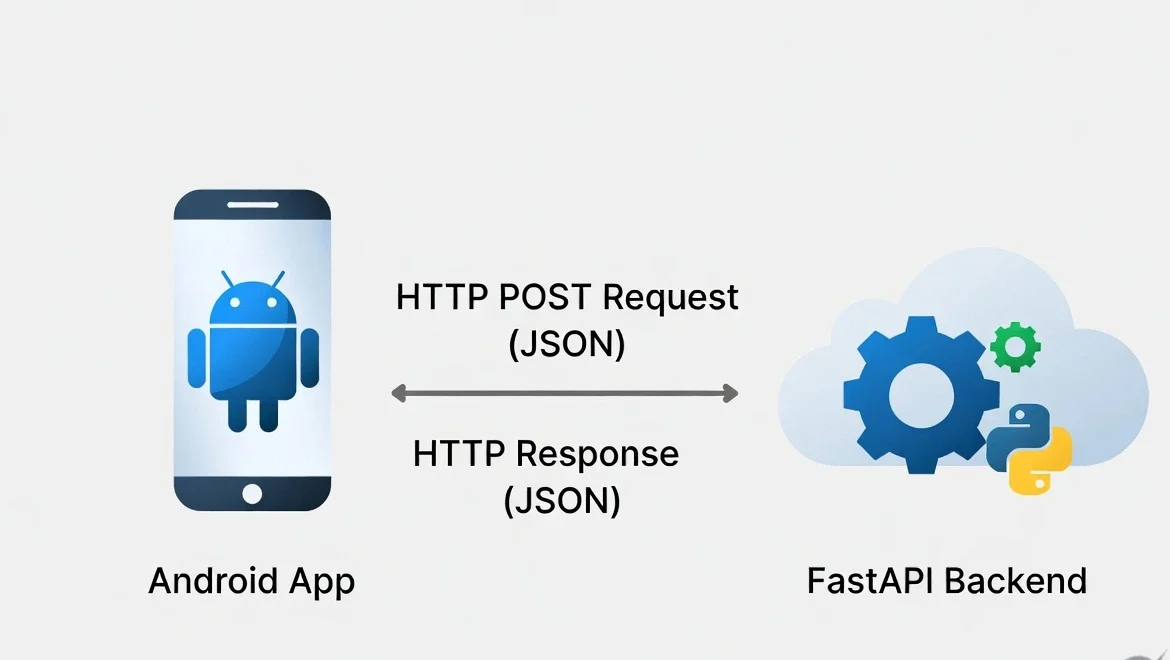
Imagine your Python server is a restaurant kitchen, and the Android App is the customer. The customer doesn’t cook the food; they just look at a menu and place an order (a “Request”). The kitchen cooks the food and hands it back (the “Response”).
To build this kitchen, we need two tools:
pip install fastapi uvicornNote: FastAPI writes the code, and uvicorn is the actual web server that runs it.
Step 2: Writing Your First API
Create a file named server.py. We are going to build a simple server that calculates the total price of items in a shopping cart—a perfect job for a backend server.
from fastapi import FastAPI
from pydantic import BaseModel

# 1. Create the App
app = FastAPI()

# 2. Define the "Menu" (What data the app is allowed to send us)
class CartItem(BaseModel):
    item_name: str
    price: float
    quantity: int

# 3. Create the "Route" (The URL the mobile app will talk to)
@app.get("/")
def home():
    return {"message": "Hello! The Python server is running."}

# 4. Create the Logic (Handling data sent from the phone)
@app.post("/calculate-total")
def calculate_cart(item: CartItem):
    # This is where Python does the math
    total_cost = item.price * item.quantity

    # We send the answer back as JSON
    return {
        "item": item.item_name,
        "total_cost": total_cost,
        "status": "success"
    }
Step 3: Turning on the Server
We cannot run this script like a normal Python file. We have to start the web server. Open your terminal in the same folder as server.py and run:
uvicorn server:app --reloadYou should see a message saying Uvicorn running on http://127.0.0.1:8000. Your server is live on your local Wi-Fi!
Step 4: Connecting the Android App
Now that the Python server is running, how does the Android app (built with Kotlin, Flutter, or React Native) talk to it?
It sends a POST request containing JSON data to your server’s IP address. Here is what the mobile developer would write in their code to trigger your Python script:
// Example: How a mobile app (like React Native/Flutter) talks to your Python code
fetch('http://YOUR_COMPUTER_IP:8000/calculate-total', {
    method: 'POST',
    headers: {
        'Content-Type': 'application/json',
    },
    body: JSON.stringify({
        item_name: "Wireless Headphones",
        price: 49.99,
        quantity: 2
    })
})
.then(response => response.json())
.then(data => console.log(data.total_cost)); // Outputs: 99.98
Scaling Up to Cloud Income
Right now, this server only works on your local Wi-Fi. When you are ready to launch your Android app to the public, you simply take this server.py file and deploy it to a free cloud host like Render.
Congratulations! You are no longer just writing scripts. You are building the backend infrastructure that powers modern Micro-SaaS and mobile applications.