

🚀 Quick Overview
- The Problem: Manually typing and formatting invoices in Word or Excel takes too much time.
- The Solution: Write a Python script that turns raw data directly into a styled PDF file.
- The Tech:
ReportLab(The industry standard for PDF generation in Python). - Time to Build: 15 Minutes.
In this tutorial, you will learn how to generate a professional PDF report using Python and the ReportLab library, completely automating your invoicing process.
If you are building a freelance business or running a side hustle, your time is money. Yet, many freelancers waste hours every month copying and pasting client names, line items, and totals into messy Microsoft Word templates just to send an invoice.
As a developer, you should never do data entry twice. If your data is already stored in a script, a database, or a spreadsheet, you can use Python to “draw” that data onto a blank PDF canvas.
Today, we will use the ReportLab library to build an automated invoice generator. You provide the code with a list of items, and it instantly spits out a clean, professional PDF ready to be emailed to your client.
Step 1: The Setup
To create PDFs from scratch, we need a powerful engine. In the Python ecosystem, ReportLab is the absolute standard for drawing text, shapes, and tables onto a digital document.
Open your terminal and install it:
pip install reportlabStep 2: Drawing on the “Canvas”
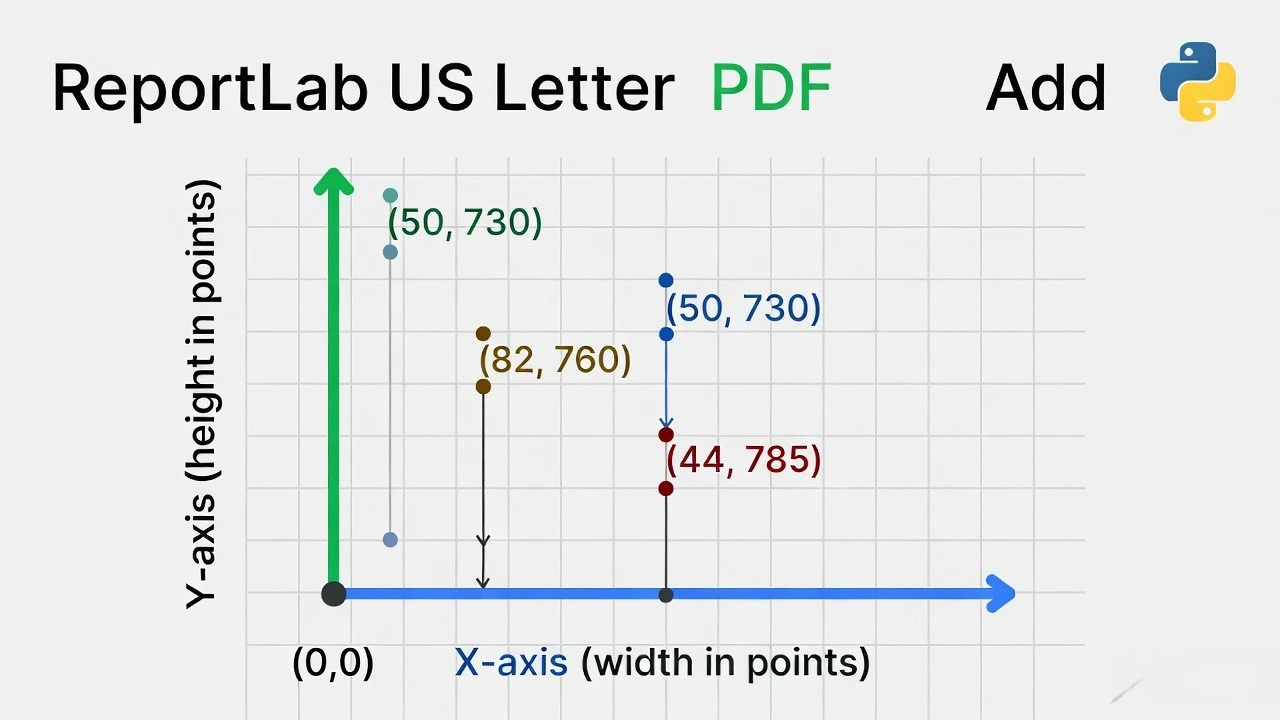
ReportLab works exactly like a painter’s canvas. You tell Python exactly where to place the text using X and Y coordinates (measured in “points,” where 1 inch = 72 points).
Create a file named invoice_bot.py. Let’s set up the page and write our company header.
from reportlab.pdfgen import canvas
from reportlab.lib.pagesizes import letter

def create_invoice(client_name, total_amount):
    # 1. Create a blank PDF file
    file_name = f"Invoice_{client_name.replace(' ', '_')}.pdf"
    pdf = canvas.Canvas(file_name, pagesize=letter)

    # 2. Add the Header (Company Name)
    pdf.setFont("Helvetica-Bold", 24)
    # X=50 (left margin), Y=730 (near the top of the page)
    pdf.drawString(50, 730, "LogicPy Web Services")

    # 3. Add a Subtitle
    pdf.setFont("Helvetica", 12)
    pdf.drawString(50, 710, "123 Tech Avenue | contact@logicpy.com")

    # Draw a line under the header
    pdf.line(50, 700, 550, 700)

    # 4. Save the file (very important!)
    pdf.save()
    print(f"✅ Generated: {file_name}")

# Test it
create_invoice("Acme Corp", 1500.00)
Run the script. Check your folder, and you will see a brand new file named Invoice_Acme_Corp.pdf. Open it up, and you’ll see your branded header!
Step 3: Adding the Billing Data
A header is nice, but an invoice needs data. Let’s update our function to include the client’s information, the date, and the total amount due.
from reportlab.pdfgen import canvas
from reportlab.lib.pagesizes import letter
import datetime

def create_full_invoice(client_name, service_desc, total_amount):
    file_name = f"Invoice_{client_name.replace(' ', '_')}.pdf"
    pdf = canvas.Canvas(file_name, pagesize=letter)

    # --- HEADER ---
    pdf.setFont("Helvetica-Bold", 24)
    pdf.drawString(50, 730, "LogicPy Web Services")
    pdf.setFont("Helvetica", 12)
    pdf.drawString(50, 710, "Invoice generated automatically via Python")
    pdf.line(50, 700, 550, 700)

    # --- BILLING DETAILS ---
    today_date = datetime.datetime.now().strftime("%B %d, %Y")

    pdf.setFont("Helvetica-Bold", 14)
    pdf.drawString(50, 650, f"Billed To: {client_name}")

    pdf.setFont("Helvetica", 12)
    pdf.drawString(50, 630, f"Date: {today_date}")

    # --- LINE ITEM ---
    # Draw a simple box for the service description
    pdf.rect(50, 550, 500, 30) # x, y, width, height
    pdf.drawString(60, 560, f"Service: {service_desc}")
    pdf.drawString(450, 560, f"${total_amount:,.2f}")

    # --- TOTAL ---
    pdf.setFont("Helvetica-Bold", 16)
    pdf.drawString(380, 500, f"TOTAL DUE: ${total_amount:,.2f}")

    # Save the document
    pdf.save()
    print(f"✅ Invoice ready for {client_name}!")

# Let's run it!
if __name__ == "__main__":
    create_full_invoice(
        client_name="Stark Industries",
        service_desc="Custom Telegram Bot Development",
        total_amount=1250.00
    )
How to Scale This Up
Right now, we are hard-coding the data. To make this a professional system, you would connect this script to your other Python automations:
- Read from Excel: Use Python to read a spreadsheet of your monthly clients, loop through the rows, and generate 50 unique PDFs in 2 seconds.
- Email Automation: Use the
smtpliblibrary to automatically attach these PDFs to an email and send them to your clients on the 1st of every month.
Conclusion
You have just bridged the gap between code and the real world. Generating PDFs dynamically is a massive value-add for any custom software you build, whether it’s a mobile app receipt, a monthly SEO report, or a freelance invoice.