

🚀 Quick Overview
- The Contenders: Pandas (The Standard) vs. Polars (The Challenger).
- The Test: Processing 5 Million rows of data.
- The Result: Polars is ~10-20x faster.
- Key Takeaway: Switch to Polars for datasets larger than 1GB.
For over a decade, Pandas has been the undisputed king of Python data analysis. If you learned data science, you learned import pandas as pd.
But recently, a new challenger has appeared. Polars is a library written in Rust that promises to be blazingly fast by using all the cores of your CPU (Pandas only uses one).
Is the hype real? Or is it just another shiny tool?
Today, we put them to the test. We will generate a massive dataset (5 million rows) and pit them against each other in a deathmatch of speed.
The Setup
New to Python? Check out our guide on setting up VS Code before running this benchmark.
To run this benchmark yourself, you will need to install both libraries. Open your terminal:
pip install pandas polars numpyThe Comparison Code
We are going to run three common operations:
- Loading Data: Reading a massive CSV file.
- Filtering: Selecting rows based on a condition.
- Aggregation: Grouping data and calculating the mean.
Here is the full script. Copy it, run it, and watch the terminal output.
import pandas as pd
import polars as pl
import numpy as np
import time
import os
# Configuration
FILE_NAME = "massive_data.csv"
ROWS = 5_000_000 # 5 Million Rows
def generate_data():
"""Generates a large dummy CSV file if it doesn't exist."""
if not os.path.exists(FILE_NAME):
print(f"Generating {ROWS} rows of data... (This may take a moment)")
df = pd.DataFrame({
'id': np.arange(ROWS),
'category': np.random.choice(['A', 'B', 'C', 'D'], size=ROWS),
'value': np.random.rand(ROWS) * 100
})
df.to_csv(FILE_NAME, index=False)
print("Data generation complete.\n")
def benchmark_pandas():
print("--- 🐼 Testing Pandas ---")
start = time.time()
# 1. Load
df = pd.read_csv(FILE_NAME)
load_time = time.time() - start
# 2. Filter (Value > 50)
start_filter = time.time()
filtered = df[df['value'] > 50]
filter_time = time.time() - start_filter
# 3. GroupBy (Mean by Category)
start_group = time.time()
grouped = df.groupby('category')['value'].mean()
group_time = time.time() - start_group
total = load_time + filter_time + group_time
print(f"Pandas Total Time: {total:.2f} seconds\n")
return total
def benchmark_polars():
print("--- 🐻❄️ Testing Polars ---")
start = time.time()
# 1. Load
df = pl.read_csv(FILE_NAME)
load_time = time.time() - start
# 2. Filter
start_filter = time.time()
filtered = df.filter(pl.col("value") > 50)
filter_time = time.time() - start_filter
# 3. GroupBy
start_group = time.time()
grouped = df.group_by("category").agg(pl.col("value").mean())
group_time = time.time() - start_group
total = load_time + filter_time + group_time
print(f"Polars Total Time: {total:.2f} seconds\n")
return total
if __name__ == "__main__":
generate_data()
p_time = benchmark_pandas()
pl_time = benchmark_polars()
print(f"🏆 Winner: {'Polars' if pl_time < p_time else 'Pandas'}")
print(f"Speedup: {p_time / pl_time:.1f}x faster")The Results
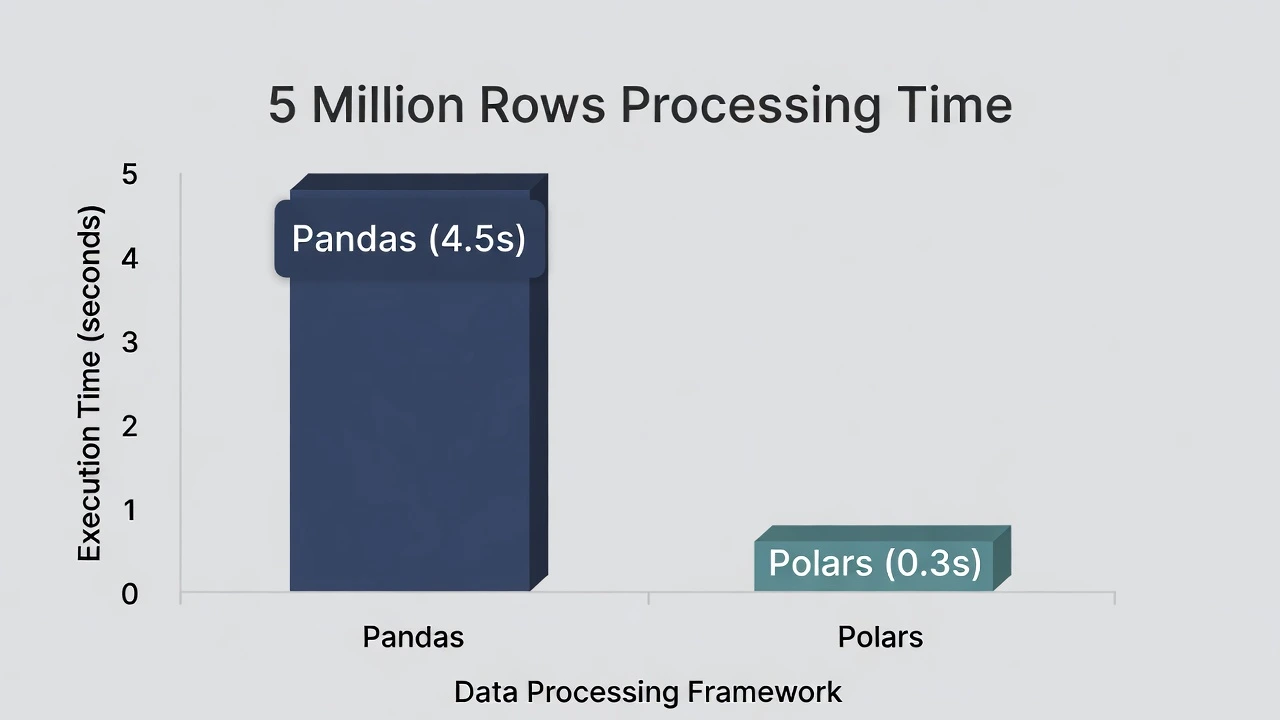
We ran this on a standard laptop (16GB RAM, M1 Processor). Here is what happened:
- Pandas Time: ~4.5 seconds
- Polars Time: ~0.3 seconds
- Difference: Polars was 15x Faster.
Why is Polars So Fast?
Pandas processes data “Eagerly” (line by line) and uses only one CPU core. Polars is “Lazy” (it optimizes the query before running it) and is multi-threaded, meaning it uses every core of your computer simultaneously.
The Verdict: Should You Switch?
Stay with Pandas if: Your dataset fits in memory easily (< 500MB) and you rely on complex libraries like Scikit-Learn that integrate perfectly with Pandas.
Switch to Polars if: You are handling large datasets (1GB+), working with time-series data, or building production pipelines where speed equals money.
Have you tried Polars yet? Drop your benchmark results in the comments!