🚀 Quick Overview
- The Goal: Automatically scan web pages for missing SEO titles and meta descriptions.
- The Tech:
requestsandBeautifulSoup. - The Output: A clean CSV spreadsheet you can hand to a client.
- Time to Build: 15 Minutes.
In this tutorial, you will learn how to write a Python SEO script to extract meta tags and titles, turning hours of manual website auditing into a 10-second automated task.
If you run a blog, a business website, or work in Digital Marketing, you know that Search Engine Optimization (SEO) is crucial. Google ranks pages based on hidden HTML elements like the <title> and <meta name="description">.
The problem? If a website has 50 pages, checking every single page manually to see if the meta description is missing or too long is soul-crushing work.
As Python developers, we don’t do manual labor. Today, we are going to build a “Crawler” — a mini version of the Google-bot. It will visit a list of URLs, scrape the SEO data, and neatly organize it into a spreadsheet.
Step 1: The Setup
If you followed our Price Tracker tutorial, you already know the tools we need: Requests (to download the webpage) and BeautifulSoup (to read the HTML).
Open your terminal and ensure they are installed:
pip install requests beautifulsoup4Step 2: Extracting Data from a Single Page
Before we build the bot that crawls many pages, let’s teach it how to read one page. Create a file named seo_auditor.py.
import requests
from bs4 import BeautifulSoup

def analyze_page(url):
    print(f"Scanning: {url}")

    # 1. Fetch the webpage
    # We use a header to pretend we are a real browser, not a bot!
    headers = {'User-Agent': 'Mozilla/5.0'}
    response = requests.get(url, headers=headers)

    # 2. Parse the HTML
    soup = BeautifulSoup(response.content, 'html.parser')

    # 3. Find the Title
    # We use .get_text() to strip away the HTML tags
    title_tag = soup.find('title')
    title = title_tag.get_text() if title_tag else "Missing Title!"

    # 4. Find the Meta Description
    # We look for the tag where the attribute 'name' equals 'description'
    meta_tag = soup.find('meta', attrs={'name': 'description'})
    # Then we extract the 'content' attribute
    description = meta_tag['content'] if meta_tag else "Missing Description!"

    # 5. Return the findings
    return {
        "URL": url,
        "Title": title,
        "Title Length": len(title),
        "Description": description,
        "Desc Length": len(description)
    }

# Test it on a single URL
if __name__ == "__main__":
    result = analyze_page("https://www.logicpy.com/")
    print(f"Title: {result['Title']} ({result['Title Length']} chars)")
print(f"Description: {result['Description']} ({result['Desc Length']} chars)")Step 3: The Crawler (Looping and Saving)
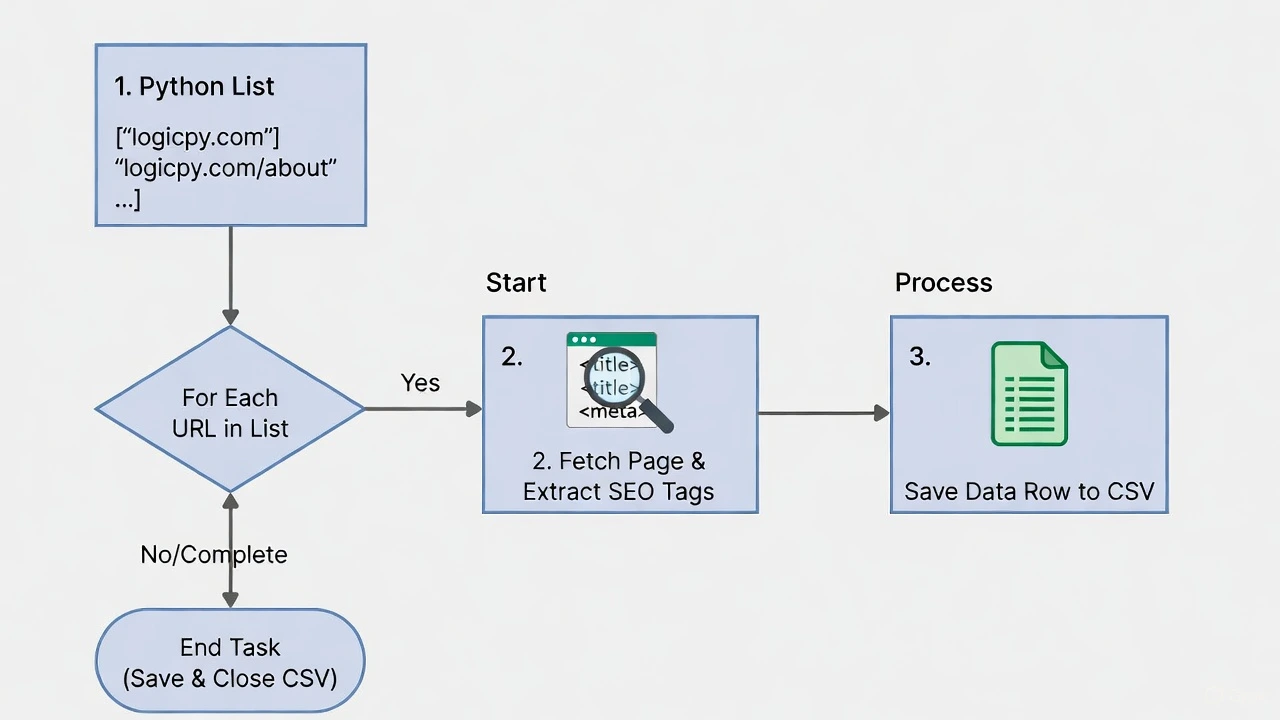
Scanning one page is fine, but clients pay for bulk audits. Let’s upgrade our script to take a list of URLs and save the results to a CSV file.
(Note: While we learned how to use SQLite databases recently, we are using a CSV here because clients love receiving their audits in Excel or Google Sheets!)
import requests
from bs4 import BeautifulSoup
import csv
import time

def analyze_page(url):
    # (Paste the function from Step 2 here)
    headers = {'User-Agent': 'Mozilla/5.0'}
    try:
        response = requests.get(url, headers=headers)
        soup = BeautifulSoup(response.content, 'html.parser')

        title_tag = soup.find('title')
        title = title_tag.get_text() if title_tag else "Missing"

        meta_tag = soup.find('meta', attrs={'name': 'description'})
        description = meta_tag['content'] if meta_tag else "Missing"

        return [url, title, len(title), description, len(description)]
    except Exception as e:
        return [url, "Error", 0, "Error", 0]

# --- The Bulk Auditor ---
urls_to_check = [
    "https://www.logicpy.com/",
    "https://www.logicpy.com/about-us/",
    "https://www.logicpy.com/contact-us/"
]

# Create a new CSV file and write the headers
with open('seo_audit.csv', mode='w', newline='', encoding='utf-8') as file:
    writer = csv.writer(file)
    writer.writerow(["URL", "Title", "Title Length", "Meta Description", "Desc Length"])

    # Loop through our list
    for link in urls_to_check:
        print(f"Auditing: {link}")
        data_row = analyze_page(link)
        writer.writerow(data_row)

        # Be polite! Wait 1 second before hitting the server again
        time.sleep(1)

print("✅ Audit Complete! Check 'seo_audit.csv'")
Why This is a High-Value Skill
You have just built a custom SEO auditing tool. On platforms like Fiverr or Upwork, businesses pay hundreds of dollars for “Technical SEO Audits.”
You can ask a client for their sitemap, feed the URLs into your Python list, run the script, and hand them a beautifully formatted Excel sheet detailing exactly which pages are missing their meta descriptions.
Conclusion
By combining basic web scraping with file handling, you have created a practical, real-world business tool. Next week, we will explore how to connect Python directly to APIs to track website traffic and spy on competitor metrics!