
🚀 Quick Overview
- Streamlit: Best for Data Science, Web Apps, and Speed.
- Tkinter: Best for Desktop Tools, Full Control, and Offline Apps.
- The Verdict: Learn Streamlit for dashboards, Tkinter for software distribution.
The Python community is divided. On one side, you have the veterans swearing by the built-in reliability of Tkinter. On the other, you have the data scientists who claim Streamlit has made traditional GUIs obsolete.
If you have 5 hours to build an app, which one do you choose?
In this honest comparison, we break down the code, the pros, the cons, and help you decide which tool deserves your time.
Round 1: The “Hello World” Test (Code Comparison)
The best way to compare them is to build the exact same app: a simple BMI Calculator. Let’s see how much code it takes.
The Tkinter Approach (Imperative)
Tkinter gives you full control, but you have to manage the layout, the event loop, and the widgets manually. It requires about 20+ lines of code for a basic app.
import tkinter as tk
from tkinter import messagebox

def calculate_bmi():
    try:
        weight = float(entry_weight.get())
        height = float(entry_height.get())
        bmi = weight / (height ** 2)
        messagebox.showinfo("Result", f"Your BMI is: {bmi:.2f}")
    except ValueError:
        messagebox.showerror("Error", "Please enter valid numbers")

root = tk.Tk()
root.title("BMI Calculator (Tkinter)")
root.geometry("300x200")

tk.Label(root, text="Weight (kg):").pack()
entry_weight = tk.Entry(root)
entry_weight.pack()

tk.Label(root, text="Height (m):").pack()
entry_height = tk.Entry(root)
entry_height.pack()

tk.Button(root, text="Calculate", command=calculate_bmi).pack(pady=20)

root.mainloop()
The Streamlit Approach (Declarative)
Streamlit is designed for speed. You don’t worry about layouts or event loops. You just write the logic top-to-bottom.
import streamlit as st

st.title("BMI Calculator (Streamlit)")

weight = st.number_input("Weight (kg)")
height = st.number_input("Height (m)")

if st.button("Calculate"):
    if height > 0:
        bmi = weight / (height ** 2)
        st.success(f"Your BMI is: {bmi:.2f}")
    else:
        st.error("Height must be greater than 0")
Winner: Streamlit. It requires significantly less boilerplate code to get a working prototype.
Round 2: Feature Comparison
Code length isn’t everything. Let’s look at what you actually get with each library.
Tkinter feels like a traditional desktop application. It’s great if you want your app to look like it belongs on Windows. Streamlit, however, creates a modern, responsive web application by default.
Round 3: Deployment (The Dealbreaker)
This is usually where the decision is made for you. The deployment methods are completely different.
Choose Tkinter if…
You want to distribute your app as a downloadable file (like an .exe) that runs offline. This is perfect for internal company tools or utilities.
(Read our guide on how to convert Tkinter scripts to .EXE files here).
Choose Streamlit if…
You want to share a URL (e.g., myapp.streamlit.app). Streamlit apps run in the browser, making them perfect for sharing data insights with clients who don’t want to install software.
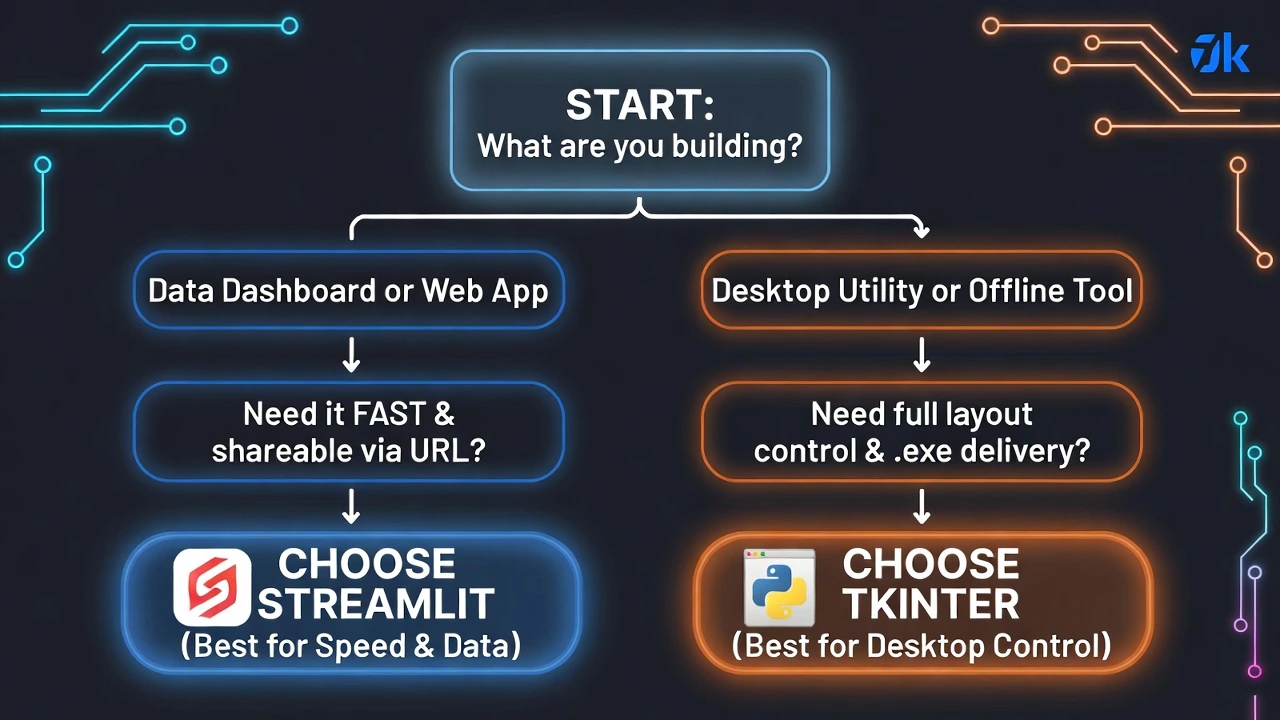
The Decision Matrix: Which One is For You?
Still not sure? Follow this simple flowchart to pick the right tool for your project.
Conclusion
Neither tool is “better”—they just serve different masters.
- Building a Data Dashboard or sharing insights online? Streamlit is the undisputed king.
- Building a Desktop Utility or need full control over the UI? Tkinter (and specifically CustomTkinter) is your reliable friend.
Which library do you prefer for your projects? Let us know in the comments below!