🚀 Quick Overview
- The Problem: Hiring voice actors and translators to localize your content for global audiences is incredibly expensive.
- The Solution: A Python script that translates your text and speaks it out loud using hyper-realistic AI voices.
- The Tech:
deep-translatorand Microsoft’s freeedge-ttslibrary. - Time to Build: 15 Minutes.
In this tutorial, you will learn how to build an automated audio translation and dubbing pipeline in Python, turning English text into realistic, foreign-language AI voiceovers instantly.
If you look at the biggest YouTube channels in the world right now, they all share one secret: they don’t just upload in English. They have Spanish channels, French channels, and German channels. Localizing your content is the fastest way to 10x your audience.
In our last tutorial, we built an Offline Whisper Bot that automatically extracts English text from podcasts and videos. Today, we are going to complete the circle.
We are going to take that text, translate it into Spanish, and generate a studio-quality AI voiceover. We are bypassing expensive APIs entirely by leveraging Microsoft Edge’s hidden neural-voice engine. Let’s build your automated dubbing studio.
Step 1: The Setup
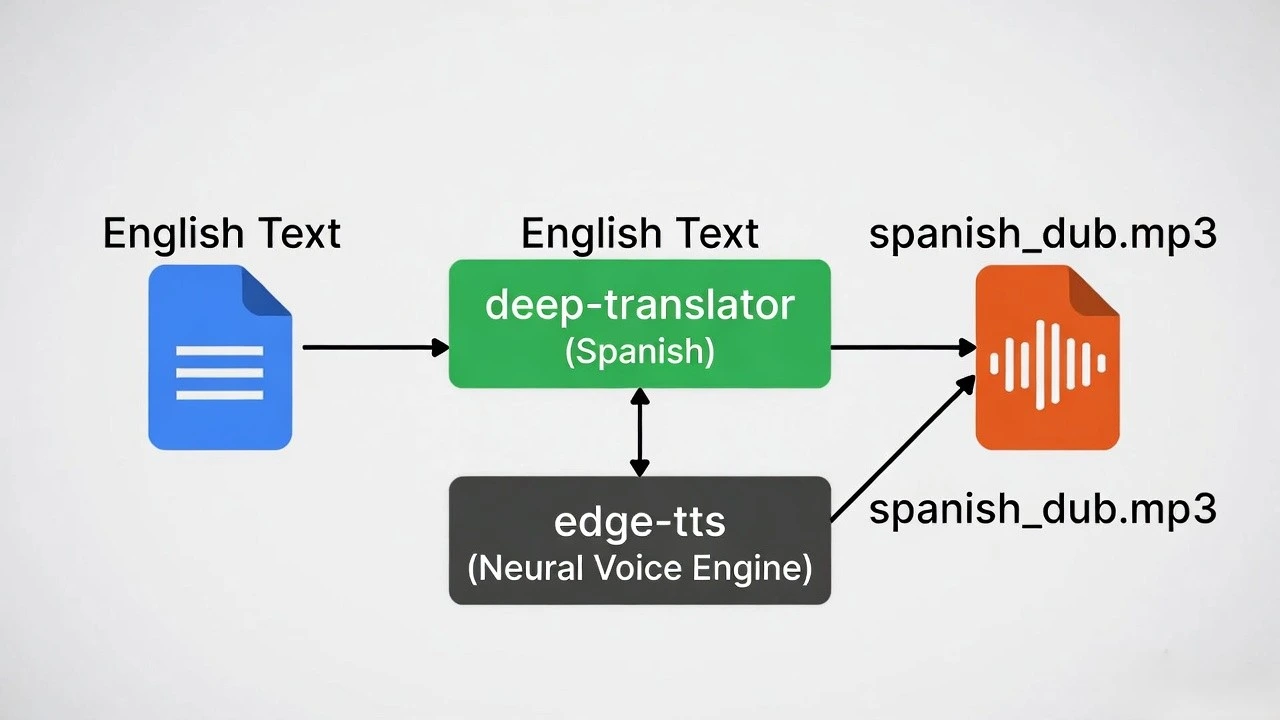
To build this pipeline, we need two tools. First, a reliable translator that doesn’t require complex API keys. Second, a Text-to-Speech (TTS) engine that sounds like a real human, not a 1990s robot.
Open your terminal and install these two powerful libraries:
pip install deep-translator edge-ttsStep 2: The Translation Engine
We will use deep-translator because it safely taps into Google Translate in the background without requiring you to set up a Google Cloud account.
Create a file named dubbing_bot.py and let’s write our translation logic:
from deep_translator import GoogleTranslator

# 1. The text we want to dub (Imagine this came from your Whisper transcript!)
english_script = "Hello everyone! Welcome back to the channel. Today, we are learning Python."

print("Translating to Spanish...")
# 2. Translate 'en' (English) to 'es' (Spanish)
spanish_script = GoogleTranslator(source='en', target='es').translate(english_script)

print("\n--- 📝 TRANSLATION ---")
print(spanish_script)
Run that script, and you will see perfect Spanish output: “¡Hola a todos! Bienvenidos de nuevo al canal. Hoy estamos aprendiendo Python.”
Step 3: Generating the AI Voiceover
Now that we have our Spanish text, we need to speak it. We are using edge-tts. This library accesses Microsoft’s “Neural” voices—the same incredibly realistic voices used in their premium Azure cloud, but absolutely free.
Let’s update our dubbing_bot.py file to add the audio generation. Note: Because generating high-quality audio takes a few seconds, this library uses Python’s `asyncio` to run the task smoothly in the background.
import asyncio
import edge_tts
from deep_translator import GoogleTranslator

english_script = "Hello everyone! Welcome back to the channel. Today, we are learning Python."

# 1. Translate the text
print("1. Translating text...")
spanish_script = GoogleTranslator(source='en', target='es').translate(english_script)
print(f"Text: {spanish_script}")

# 2. Setup the Voiceover
# We are choosing 'Alvaro', a realistic male Spanish voice.
# You can see all voices by typing `edge-tts --list-voices` in your terminal!
voice = "es-ES-AlvaroNeural"
output_file = "spanish_dub.mp3"

# 3. Create the Audio Generator Function
async def generate_dub():
    print("2. Generating AI Voiceover...")
    # Feed the Spanish text and the chosen voice into the engine
    communicate = edge_tts.Communicate(spanish_script, voice)
    # Save it as an MP3
    await communicate.save(output_file)

# 4. Run the generator
asyncio.run(generate_dub())
print(f"✅ Success! Listen to your new audio file: {output_file}")
Step 4: The Result
Run your script. In just a few seconds, a file named spanish_dub.mp3 will appear in your folder.
Open it up and listen. You will hear a natural, flowing Spanish voice with proper breathing, inflection, and tone. You just saved yourself hundreds of dollars in voice-acting fees.
Real-World Freelance Value
This script is the engine for a modern content business:
- Global Faceless Channels: Scrape trending Reddit stories, translate them into 5 different languages, and auto-generate the voiceovers to run multiple global YouTube channels simultaneously.
- Corporate Localization: Offer businesses a service to take their English training videos and dub the audio for their international employees in Europe and South America.
Conclusion
You have successfully automated the localization process. By combining translation APIs with advanced neural Text-to-Speech engines, you can expand any piece of content to a global audience. Next week, we will jump into Programmatic Video Editing to learn how to stitch this audio together with visual content!