🚀 Quick Overview
- The Problem: Finding a 60-second viral moment inside a 3-hour podcast requires hours of tedious scrubbing and manual listening.
- The Solution: A Python bot that downloads the video, transcribes it, searches for a specific keyword, and automatically cuts the exact clip.
- The Tech:
yt-dlp,openai-whisper, andmoviepy. - Time to Build: 30 Minutes.
In this tutorial, you will combine yt-dlp, Whisper AI, and MoviePy to build a Python script that automatically finds and extracts viral highlights from long-form podcasts.
Over the last month, we have built a powerful arsenal of visual and audio automation tools. Today, we put them all together.
There is currently a massive gold rush in the creator economy for “Podcast Clippers.” Agencies are charging thousands of dollars a month to take a creator’s long-form YouTube video, find the best 60-second moments, and cut them into Shorts or TikToks. Meanwhile, SaaS companies are charging hefty monthly subscriptions for AI tools that do the same thing.
You don’t need to pay an agency, and you don’t need to pay for an expensive SaaS. You are a developer. Today, we are going to build our own AI clipping engine from scratch.
Step 1: The Pipeline Architecture
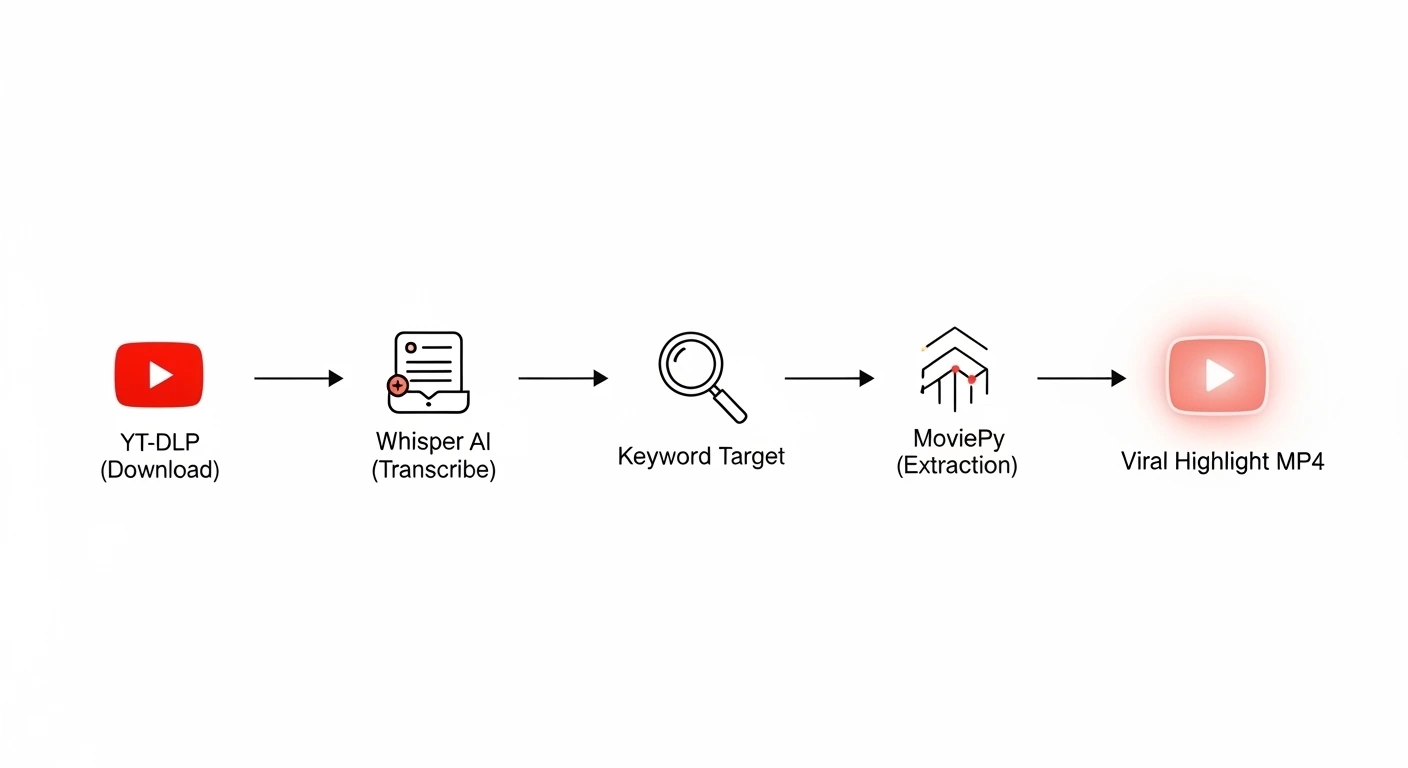
Before we write the code, we need to understand the logic of our machine. Our pipeline will execute four distinct steps entirely autonomously:
- Acquisition: Use
yt-dlpto download a podcast video directly from YouTube. - Analysis: Feed the MP4 into OpenAI’s
whisperto generate a timestamped transcript. - Targeting: Search that transcript for a specific “viral keyword” (e.g., “artificial intelligence”, “stock market”, or “crazy story”).
- Extraction: Pass the exact start and end times to
moviepyto cut the clip, adding a 5-second buffer so the video flows naturally.
Step 2: The Capstone Script
Ensure you have all our libraries installed from previous weeks (pip install yt-dlp openai-whisper moviepy) and that your system has FFmpeg.
Create a file named auto_clipper.py. This is the master script.
import yt_dlp
import whisper
from moviepy.editor import VideoFileClip

# --- CONFIGURATION ---
TARGET_URL = "https://www.youtube.com/watch?v=YOUR_PODCAST_ID"
SEARCH_KEYWORD = "artificial intelligence"
OUTPUT_FILENAME = "raw_podcast.mp4"

# --- 1. ACQUISITION (Download the Video) ---
print("1. Downloading Podcast...")
ydl_opts = {
    'format': 'best[ext=mp4]',
    'outtmpl': OUTPUT_FILENAME,
    'quiet': True
}
with yt_dlp.YoutubeDL(ydl_opts) as ydl:
    ydl.download([TARGET_URL])

# --- 2. ANALYSIS (Transcribe the Audio) ---
print("\n2. Transcribing with Whisper AI... (This may take a few minutes)")
model = whisper.load_model("base")
result = model.transcribe(OUTPUT_FILENAME)

# --- 3. TARGETING (Search for the Keyword) ---
print(f"\n3. Searching for keyword: '{SEARCH_KEYWORD}'")
target_segment = None

for segment in result["segments"]:
    # Convert both to lowercase to ensure a match
    if SEARCH_KEYWORD.lower() in segment["text"].lower():
        target_segment = segment
        print(f"🎯 Match found! \"{segment['text']}\"")
        break # We found our clip, stop searching!

# --- 4. EXTRACTION (Cut the Video) ---
if target_segment:
    print("\n4. Extracting the video clip...")

    # Add a 5-second buffer before and after the keyword is spoken for context
    start_time = max(0, target_segment["start"] - 5)
    end_time = target_segment["end"] + 10 # Let the thought finish

    # Load the massive video, but only extract our specific timeframe
    video = VideoFileClip(OUTPUT_FILENAME).subclip(start_time, end_time)

    # Save the final viral clip
    highlight_name = f"highlight_{SEARCH_KEYWORD.replace(' ', '_')}.mp4"
    video.write_videofile(highlight_name, fps=24, codec="libx264", audio_codec="aac")

    print(f"\n✅ SUCCESS! Your viral clip is ready: {highlight_name}")
else:
    print(f"\n❌ Keyword '{SEARCH_KEYWORD}' was not found in the podcast.")
Step 3: Watch the Magic Happen
Run the script. Go grab a coffee.
While you are away, your computer will securely reach out to the internet, download a massive video file, run an advanced AI model over the audio to understand the human speech, isolate the exact moment your topic of interest is discussed, and render a clean, high-quality video file containing only that exact conversation.
The Ultimate Freelance Portfolio Piece
This is not just a tutorial; it is a fully functioning software product. From here, you have infinite ways to scale it using the tools you’ve learned over the last four weeks:
- Auto-Reformatting: Pass the newly generated
highlight.mp4into our Auto-Cropper script to instantly turn it into a 9:16 vertical video. - Viral Subtitles: Pass the cropped video into our Auto-Subtitler script to burn the text onto the screen.
- Zero-Touch Automation: Hook it up to a Telegram bot so you can text your computer a YouTube link from your phone, and it automatically texts you back a finished TikTok video 10 minutes later.
Conclusion
Congratulations. You have completed the AI Content Creator Toolkit. You have transitioned from writing simple data parsers to architecting full-scale, automated multimedia pipelines. The creator economy is massive, and you now have the exact engineering skills required to build the tools that power it. Keep building!